Maintenance Toolkit 4.1.2
Start MT in a few simple steps
Follow the steps from top to bottom.
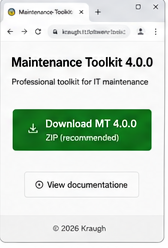
Verify integrity and signatures
To verify that the downloaded ZIP matches the official release, compare its SHA-256 with the value published on the Maintenance Toolkit page.
Get-FileHash .\MaintenanceToolkit-4_1_2.zip -Algorithm SHA256Unblock the ZIP before extracting it
If the ZIP Properties dialog shows Unblock, select it and confirm. Do this on the ZIP before extraction; you do not need to unblock files one by one.
Nothing is required: continue with extraction.
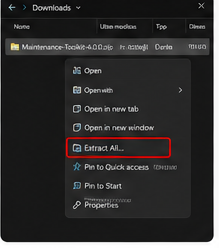
Extract All
Right-click the ZIP file and choose Extract All…
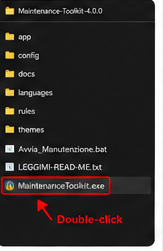
Run Maintenance Toolkit
In the extracted folder, double-click MaintenanceToolkit.exe.
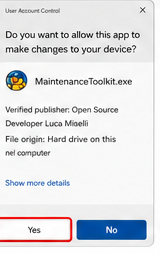
Confirm the request
When Windows asks for permission to make changes, click Yes.
The dialog shows: Verified publisher: Open Source Developer Luca Miselli.
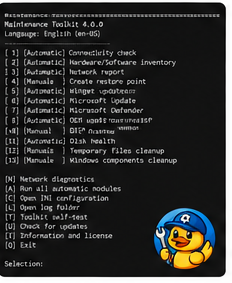
The menu is ready
Run one module or press [A] to execute the enabled automatic modules. When the session finishes, open its summary to see immediately whether everything completed normally or whether warnings/errors need attention.
Continue with the usage and automation guide
Features inherited from 4.0.6
- Machine-local Winget exceptions: exclude exact package IDs or block the entire module.
- Discovery and validation of the App Installer executable when Winget is missing from the SYSTEM PATH, introduced in 4.0.5.
- Dell apply.outcome reflects final verification: installed, remaining, deferred, restart required or failed verification.
- Exception evidence and partial coverage are preserved in the snapshot for DMT.
Hardware/software inventory, NVIDIA checks without download or installation, and OEM safeguards remain available. No automatic restart.
Maintenance Toolkit 4.1
The Languages menu (H) selects Italian, English, French, Spanish, German, Simplified Chinese or Japanese. The five new translations cover menus and 4.1 workflows; some historical diagnostics use English fallback. Documentation and the website are available in Italian and English.
MT updates, SYSTEM scheduling and standalone/GPO management →
4.1 integrity: obtain the signed payload catalog from the same release; verify the publisher and timestamp, then verify extracted scripts/resources with Test-FileCatalog before execution or unblocking. Verification and upgrade instructions.
4.1.2: verified installation detection fix
Malformed uninstall paths belonging to unrelated programs no longer block MT installation detection on Windows PowerShell 5.1. Invalid MT registrations remain blocked. Affected 4.1.1 installations need a verified manual MSI/ZIP upgrade. The final signed packages passed fresh MSI installation and manual MSI/ZIP upgrades from 4.0.6 and 4.1.1 on Windows 11 / PowerShell 5.1, installed SelfTest, data/task preservation, signed-script tamper rejection and locked-file ZIP recovery. No maintenance or automatic restart was executed. Windows 10, real GPO/corporate SMB and live selective Winget are not certified by these tests. GPO remains responsible for managed installations. Seven UI languages are available, with partial translation coverage and English fallback; documentation remains Italian/English. Earlier public packages remain unchanged.